

What Is MovieBox?
MovieBox is a free streaming app for Android that puts movies, TV shows, anime, live sports and light novels in one dark, fast player. There is no account to create and no subscription to pay: open the app, pick a title, and press play. That simple deal is why the MovieBox APK has been passed around by movie fans for years, from phones to tablets to TV sticks.
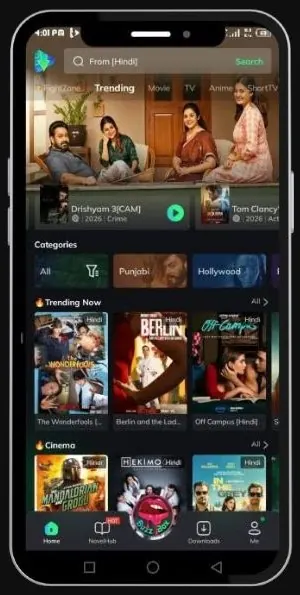
The app is built around browsing. The home screen shows what is trending now, with rows for Cinema, Hollywood, Bollywood and more, and a search bar that finds a title in seconds. Each title page carries its poster, rating, language options and episode list, plus buttons to add it to a list, share it, or download it for later. A separate Novels tab holds light novels for readers, and a Sports section carries live fixtures and TV channels.
MovieBox is not on the Google Play Store, so Android phones install the MovieBox APK from a file instead. That is normal for apps distributed this way, and it is also why this page exists: to give you the checked file details, the install steps that actually work, and the update routine that keeps your downloads safe.
What Is New in the Latest MovieBox Update
MovieBox APK updates land regularly, and the recent ones all pull in the same direction: faster playback, fewer dead links, and downloads that behave. Here is what the latest update brings to the app.
- Faster background downloads. Downloads now keep going even when the screen turns off, so a movie finishes while the phone sits in your pocket.
- A new Asian dramas tab. Trending Asian dramas and short drama series have their own place, so they no longer hide inside the general movie rows.
- Better 4K streaming. 4K and 1080p titles load faster, with less buffering and dead server links removed from the lists.
- Smart video resume. Close the app mid-episode and come back later: playback picks up exactly where you stopped.
- Cleaner browsing. Trending rows refresh more often, and the search results show the right language version first.
Because the app is not on the Play Store, updates do not arrive on their own. The update guide further down this page shows how to check the version you have and install the matching update over it, without losing a single downloaded title.
How MovieBox Works
The MovieBox APK works like a pocket cinema with a search bar. Open it and the home screen offers trending titles first, then rows by category: Cinema for new films, Hollywood and Bollywood for regional picks, TV for series, Anime for animation, and Sports for live events. Tap any poster to open its page, where you choose the language, the quality, and whether to stream now or download for later.
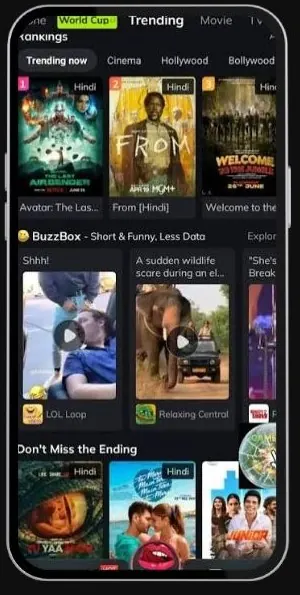
Playback is the core of the app. Tap play and the video starts in the built-in player, which handles quality switching, subtitles and resume on its own. Downloads go to the Downloads tab, where each file shows its progress and stays available offline until you delete it. A short-video feed called BuzzBox sits on the home screen for quick clips between full titles.
Nothing in the app asks for money up front. The free tier carries the full library, and an optional VIP tier exists inside the app for viewers who want higher-quality sources and faster delivery. Watching itself needs no account: you can browse, search and play without signing in.
Main Features
Eight features do most of the work in the MovieBox APK. Each one is simple on its own, and together they are the reason people keep the app on their phones.
HD and 4K Streaming
Movies and shows stream up to 4K where the source allows it, with 1080p and 720p steps for slower connections. Quality can be changed mid-playback.
Offline Downloads
Download whole movies or full seasons to the phone and watch them anywhere, even with no connection at all. Downloads keep going in the background.
No Sign-Up Needed
There is no account wall. Install the app, open it, and start watching. An optional account exists for viewers who want one, but it is never required.
Subtitles in Many Languages
Subtitles are available in several languages, with size and timing controls in the player, so a dubbed or subbed title still reads comfortably.
Live Sports and TV
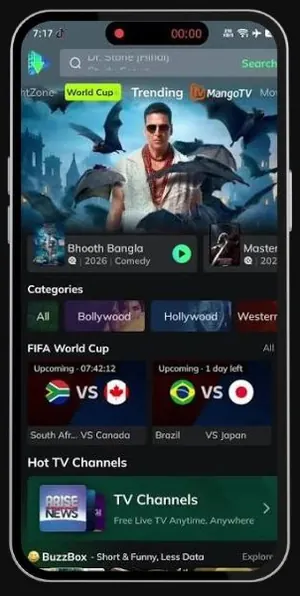
Live fixtures, match schedules and free TV channels sit in their own section, so a game night needs no second app.
Novels Hub
Light novels in English and Urdu live inside the app, readable on the phone or downloadable to read later, with new titles added regularly.
Music Collection
A music section holds movie soundtracks, trending songs and music videos, sorted by singer, mood and popularity.
Smart Resume
Stop a title anywhere and the app remembers the exact second. Open it days later and playback continues from the same frame.
What You Can Watch
The library is organised into six clear shelves, so you rarely have to dig.
- Movies. Hollywood, Bollywood, Punjabi and regional cinema, from new releases to older favourites, with ratings shown on every poster.
- TV Shows. Series and web shows with season and episode lists, including Hindi-dubbed versions of popular titles.
- Anime. Subbed and dubbed anime with episode lists and a dedicated Anime tab for quick browsing.
- Live Sports. Football, cricket, WWE and more, with upcoming fixtures listed by date and time.
- Novels. Light novels to read inside the app, in English and Urdu.
- Music. Soundtracks, trending songs and music videos for listening between shows.
Content availability changes by region and by source, so a title that plays today can be missing tomorrow. If a title will not load, try another quality or another episode before assuming the app is broken: the troubleshooting section below covers the usual fixes.
MovieBox Screenshots
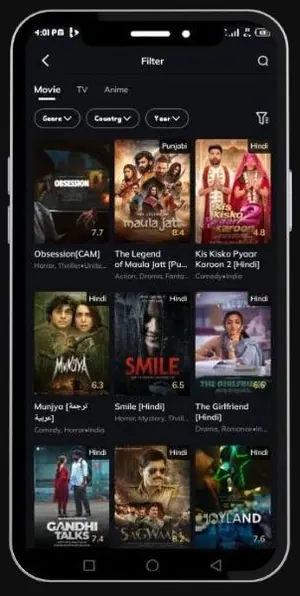
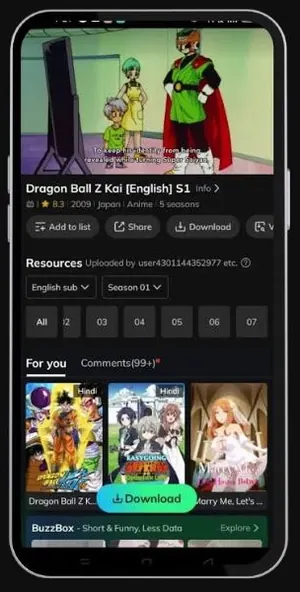
Every frame below shows MovieBox as it appears on an Android phone: the trending home screen, the filter view, the sports section, and an anime title page with its episode list and download button.
Safety and Verification
Every MovieBox APK file listed on this site goes through the same checks before it appears on the download page. The package name must match the app it claims to be, which for MovieBox is com.community.mbox.ng. The file is installed on our own test phones first, opened, and played with, so a broken or mismatched build never reaches the button.
Keep Play Protect switched on while you install. If Android shows a warning, read it before you tap through: a warning is information, not a stop sign, and turning off your phone's security to install an app is never the right trade. The install steps on this page never ask you to disable Play Protect or to root the phone.
One more check is yours to run. After installing, open Settings, then Apps, then MovieBox, and confirm the package name and the app you see match what this page lists. If anything looks different, stop and compare the file again before you sign in or download anything inside the app.
How to Download and Install MovieBox on Android
Installing the MovieBox APK takes about three minutes, and most of that is the download itself. Follow the steps in order and the app lands on your home screen without drama.
- Open the MovieBox APK download page on this site and wait for the short countdown. When the button appears, tap it and let the APK file finish downloading.
- Open the finished file from your browser's Downloads list or from the Downloads folder in your file manager.
- Android will ask whether your browser may install apps. Allow it for this one file only, then tap Install.
- When the install finishes, open MovieBox from your home screen. The home screen loads with trending titles and no sign-in prompt.
- Go back to Settings and switch the install permission off again. It did its job, and leaving it on invites trouble later.
If the phone says the app is not installed, the usual cause is a half-finished download or an older MovieBox already on the phone with a different signature. Download the file again, check that it finished, and see the troubleshooting section for the rest.
How to Update MovieBox Without Losing Your Downloads
Updates are the one place where MovieBox APK owners lose things, because the instinct is to uninstall the old app first. Do not. An update must install over the app you already have, so your downloads, watchlist and settings survive.
First, check what you have. Open Settings, then Apps, then MovieBox, and note the version and the package name shown there. The package must read com.community.mbox.ng. Then fetch the update file from the MovieBox APK download page here and compare: the new file must carry the same package name, or Android will refuse it as a different app.
Install the update file the same way you installed the app: tap it, allow the browser to install apps for this one file, and let it finish. Open MovieBox and check the Downloads tab before you change anything else. If your downloads are there, the update worked. If Android reports a package conflict instead, you have a mismatched file: get the matching update for your installed package rather than uninstalling to force it.
Devices That Run MovieBox
The MovieBox APK is an Android app, and it runs on the hardware Android owners actually carry.
- Android phones and tablets. The main home for the app. Phones get the full interface with touch navigation, and tablets get the same layout with more room per row.
- Android TV and Firestick. The app sideloads onto TV sticks with the Downloader app. A mouse toggle or the TV remote handles navigation, and playback runs full screen.
- PC and Mac. There is no native desktop app. The usual route is an Android emulator such as BlueStacks, where the same APK installs and runs.
- iPhone and iPad. An APK cannot install on iOS at all. Apple devices need the platform-specific options that belong to that side of the service, not this file.
Before you install, check that the phone has enough free space for the app plus whatever you plan to download. A movie download needs room beyond the app itself, and a full phone is the most common reason a download stalls at the last percent.
Technical Details
The facts that matter when you compare MovieBox APK files or check an install.
Version and file size come from the file itself: the file attached to the download page is version 4.0.03.1028.03, 61.36 MB, and the APK details table on this page lists the same checked facts. No number here is guessed.
Pros and Cons
Pros
- Free to watch, with no account required to start.
- Movies, TV, anime, sports, novels and music in one app.
- Offline downloads that keep going in the background.
- HD up to 4K with quality switching in the player.
- Smart resume picks up exactly where you stopped.
Cons
- Not on the Play Store, so updates never arrive on their own.
- Content availability varies by region and by source.
- Some titles are only available with a VIP tier inside the app.
- TV stick navigation needs a mouse toggle or patience.
- An APK cannot install on iPhone or iPad.
Troubleshooting
Most MovieBox APK problems have short fixes. Work through them in order before you reinstall anything.
App not installed
Check storage first, then check the download: a file that stopped halfway will not parse. If an older MovieBox is already on the phone with a different signature, Android will refuse the new file. Fetch the matching update for your installed package instead of forcing it.
Buffering or playback errors
Test the connection, then drop the quality one step and try the same title again. If one title buffers and another plays fine, the problem is that title's source, not your phone. Try a different quality or a different episode.
No sound, or subtitles out of sync
Check the player controls: the volume and subtitle tracks sit inside the player, not in the phone settings. Subtitle delay can be nudged in the subtitle menu, and switching the subtitle language off and on again fixes most sync drift.
Downloads stuck or missing
Check free space, then check that the download was not paused by battery optimisation. Open the Downloads tab and resume the file there. Downloads vanish when the app is uninstalled or its storage is cleared, so never clear storage to fix a stuck download.
The app opens but nothing loads
Close the app fully and open it again on a fresh connection. If the home screen stays empty, the service behind the lists is having a bad hour: wait, then try again before you change anything on the phone.